
ShiftKey - PRN Healthcare Jobs
ShiftKey, LLCMedical
4.5643.00 Reviews
- Version
- 1.118.0
- Installs
- 100.00K
- Age Rating
- Everyone
Screenshots




Our Review of ShiftKey - PRN Healthcare Jobs
 Analysis by Appyee
Finding healthcare work from a phone sounds simple until the timing becomes important. A nurse, therapist, or dental professional may be checking opportunities between shifts, during a commute, or while deciding whether an unexpected opening is worth taking. My experience with ShiftKey - PRN Healthcare Jobs is that its value depends heavily on how quickly and reliably it can connect a worker with current opportunities. It is a medical-category app from ShiftKey, LLC, and it is aimed at people looking for flexible healthcare work rather than patients searching for treatment.
The app is free and available to an Everyone-rated audience, although its practical audience is clearly healthcare professionals. It has built a strong enough user base to reach more than one hundred thousand installs, with an average rating of 4.5 from roughly six thousand ratings. Those figures suggest that the basic idea works for many people, but they should not be mistaken for a promise that every shift, location, or profession will suit every user.
How the connection changes the way I use ShiftKey
The most important part of using this app is not simply opening a list and reading it. It is maintaining a dependable connection while opportunities are being loaded, reviewed, and acted upon. A shift marketplace is naturally time-sensitive: information can change while I am looking at it, and an opportunity that appears useful may no longer fit once I check the details. That makes network quality part of the experience rather than a background technical concern.
I found the app most useful when I treated it as a tool for checking possibilities, not as a replacement for planning. With a stable connection, I could browse when I had a few minutes, compare an opening with my existing commitments, and decide whether it deserved attention. The process feels much less dependable when I am in a weak-signal area and trying to make a decision quickly. Even if the app opens normally, delayed loading can make a marketplace feel less responsive than a static job board.
This is where the app differs from a traditional healthcare recruitment website. A website viewed on a laptop is often better for extended research, document preparation, and comparing several employers at once. ShiftKey is more naturally suited to the moment when I want to check what is available from my phone. That convenience is useful, but it also encourages quick decisions, so I would still read each opportunity carefully rather than treating the first suitable-looking result as automatically worthwhile.
Checking opportunities during an ordinary day
One realistic use case is a healthcare worker finishing a scheduled shift and wanting to see whether another suitable opportunity is available later in the week. Instead of waiting until getting home, the worker can use a short break to check the app. The advantage is speed: the phone is already nearby, and the search can happen in the same place where the decision is being made.
That convenience has a trade-off. A busy clinical environment is rarely the best place to review important details. Noise, interruptions, and poor reception can all lead to missed information. I would use a break to identify interesting options, then revisit the details somewhere quieter before committing. This two-step habit is more sensible than trying to complete every part of the process while distracted.
The same approach works for someone who has a changing schedule. A professional with variable availability may not want a conventional full-time job search, while a person with a fixed schedule may only need occasional extra work. The app is more compelling for the first group because its mobile format supports repeated checking. For someone seeking a permanent position with a predictable schedule, a hospital careers page or a specialist recruiter may provide a clearer long-term path.
What mobile access does well, and where it creates friction
The phone-first experience is valuable because healthcare workers do not always work at a desk. I can imagine using it at home before leaving, during a permitted break, or after a schedule change. The small screen is also a limitation. Comparing several opportunities side by side is less comfortable than doing the same thing on a larger display, and detailed reading is harder when I am tired or in a hurry.
My practical advice is to separate discovery from commitment. Use the app on the move to notice possibilities, but give yourself enough time to verify the location, timing, professional fit, and any other conditions shown for the opportunity. This is one of the less obvious strengths of the app: it fits naturally into short checks. Its less obvious weakness is that the same convenience can encourage rushed browsing.
Profession matters as well. The app’s focus covers nursing, therapy, and dentistry, so it is not a general employment platform for every healthcare role. A nurse may find the concept immediately relevant, while a professional outside those areas may gain little from installing it. Even within those fields, the usefulness will depend on whether the available opportunities match the user’s credentials, preferred setting, and travel limits.
When the connection is unreliable
A mobile job app should be judged not only by how it feels on a strong connection, but also by how a user behaves when the connection becomes unreliable. I would not make an important work decision while assuming that a partially loaded screen contains the complete picture. If a listing seems incomplete, I would wait until the connection is stable and reopen it rather than relying on memory or a screenshot.
There is also a difference between an app failing to load and an opportunity no longer being suitable. A slow connection may make the first problem look like the second. My recovery routine would be simple: move to a stronger signal, close and reopen the relevant screen, and check the details again before taking action. If I had already written down a shift’s basic information, I would use that note only as a reminder, not as proof that the opportunity remains available.
This matters especially for people who regularly travel between facilities or work in buildings with inconsistent reception. A user may have excellent service outside and poor service inside a workplace. I would avoid leaving a time-sensitive check until the last minute. Reviewing options earlier gives the app more room to recover from a weak connection and gives me time to confirm that the choice still fits my schedule.
The app’s current version is 1.118.0, and it supports devices running at least OS 9. Keeping the operating system and app reasonably current is a sensible part of recovery, particularly when a problem appears repeatedly rather than only in one location. I would also distinguish between a local network issue and an account or listing issue before assuming the app itself is at fault.
Using it without wasting mobile data
Because this is a browsing-oriented app, data-conscious use is mostly about habits. I would avoid repeatedly refreshing the same screen while moving through an area with unstable service. Refreshing again and again can create the impression that the marketplace is changing rapidly when the real problem is simply that the connection has not completed the request.
For routine planning, I would check opportunities when connected to a trusted Wi-Fi network, then use mobile data for shorter follow-up checks. That does not remove the need for a live connection, but it makes the process more predictable. It also encourages better preparation: I can decide which days and locations matter before opening the app rather than browsing aimlessly.
Another useful habit is to keep a short personal record of the options I am genuinely considering. I would note the date, approximate timing, location, and why the opportunity interests me, then return to the app to verify the current details. This is not a substitute for the live listing. It simply reduces unnecessary searching and helps me remember what I intended to compare.
I would be careful with screenshots as well. They can be useful for personal reference when reception is poor, but they can become outdated. A marketplace listing is not like a saved article; its relevance depends on current availability and accurate details. The safest workflow is to use any saved reference to find the opportunity again, then check the live information before proceeding.
How it compares with familiar alternatives
Compared with a broad job board, ShiftKey feels more focused on flexible healthcare work. A general platform may offer a larger variety of industries and more conventional application flows, but that breadth can make it harder to separate relevant clinical opportunities from everything else. The focused approach is helpful when I already know that I want nursing, therapy, or dentistry work.
Compared with contacting facilities individually, the app can save time during the discovery stage. Calling or visiting employers may provide a more personal conversation, and a facility’s own recruitment team may be better for permanent roles or questions that require detailed context. I would therefore see ShiftKey as a complement to those channels, not a complete replacement for them.
Compared with a desktop recruitment site, the app wins on immediacy and loses on workspace. It is better for checking from wherever I happen to be, while a larger screen is better for careful comparison and organizing a longer search. The right choice depends on the task: quick opportunity discovery favors the app, while extensive career planning may favor a browser and direct employer research.
Who should use it, and who should look elsewhere
I would recommend trying it if you are an eligible nursing, therapy, or dental professional who values flexible work and wants to check possibilities from a mobile device. It is particularly suitable for people whose availability changes, who want to explore additional shifts, or who dislike waiting until they are at a computer to begin a search.
I would be less enthusiastic for someone who wants a single permanent employer, a long-term career-planning service, or a platform covering every type of medical occupation. In those situations, direct hospital careers pages, professional associations, or a specialized recruiter may offer more context and a more structured process. The app is also not the right tool for a patient looking for medical advice or a healthcare service; its purpose is employment discovery.
Before relying on it, I would consider three practical questions. Can I check opportunities with a reliable connection when needed? Do the professional categories and locations match my situation? Am I comfortable reviewing details carefully on a phone instead of assuming that speed is the same as suitability? If the answer to all three is yes, the app has a clear role. If not, it may become an occasional supplement rather than a primary job-search tool.
My conclusion on connectivity and everyday usefulness
After using it as a mobile healthcare-work marketplace, I see ShiftKey - PRN Healthcare Jobs as most valuable when it shortens the distance between “I have availability” and “I can see what might fit.” Its free access lowers the barrier to trying it, and its established rating profile shows that many users find the concept worthwhile. The developer, ShiftKey, LLC, has positioned the app around a specific professional need rather than general job hunting.
Its main limitation is inseparable from its main advantage. Mobile access makes checking convenient, but the experience is more dependent on a reliable connection and focused attention than a traditional, slower job search. Weak reception, rushed reading, and outdated saved information can all reduce confidence. I would use it proactively, check important details again before committing, and keep a second route available for permanent or highly specialized roles.
My connectivity verdict is positive, with a practical condition: use the app for live discovery, not careless last-minute decisions. For the right healthcare professional, it can fit neatly into the gaps of a changing workday. For everyone else, especially people seeking patient care or a conventional full-time recruitment process, another type of service will probably be more appropriate.
Verdict
Strengths of ShiftKey - PRN Healthcare Jobs
- Flexible shifts let healthcare workers choose when and where they work.
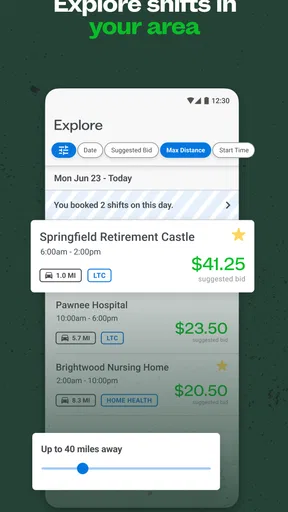
- Useful filters help narrow listings by specialty, location, and schedule.
- In-app messaging can simplify communication with facilities and recruiters.
- Shift details and requirements are available before accepting an assignment.
- Can help discover per diem opportunities beyond traditional job boards.
Limitations of ShiftKey - PRN Healthcare Jobs
- Availability varies greatly by location and healthcare specialty.
- Some shifts may require extensive credential and compliance documentation.
- Facility response times can differ, delaying confirmation of applications.
- Last-minute cancellations or schedule changes may disrupt your plans.
- The app is mainly useful for licensed healthcare professionals, not general job seekers.
Similar Picks in This Category
View All
WebMD: Symptom Checker
WebMD, LLC4.1

Microphone Amplifier
DOSA Apps4.2

Anatomy Learning - 3D Anatomy
3D Medical OU4.5

Period Tracker and Calendar
SimpleInnovation4.9

GoodRx: Prescription Coupons
GoodRx4.8

CVS Health
CVS Pharmacy4.5
Frequently Asked Questions
What is ShiftKey - PRN Healthcare Jobs, and who is it designed for?
ShiftKey is a healthcare staffing marketplace designed primarily for licensed and credentialed healthcare professionals looking for per diem, PRN, and flexible shifts. Nurses, nursing assistants, therapists, and other eligible clinicians can browse available opportunities from participating facilities, review shift details, and choose work that fits their schedule. Availability and supported professions may vary by location.
How do I find and apply for healthcare shifts through ShiftKey?
After creating an account and completing the required professional profile, you can browse shifts using filters such as location, date, profession, facility, and pay information. Each listing normally includes important details before you commit, including the shift time and workplace. When you find a suitable opportunity, you can request or claim it according to the app’s current booking process and facility requirements.
What documents and requirements are needed to use ShiftKey?
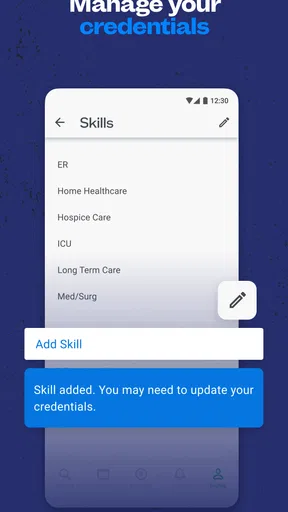
ShiftKey generally requires users to verify their professional identity, license or certification, and other compliance information before they can work a shift. Depending on your profession, state, and facility, this may include background checks, immunization records, training certificates, work history, or additional credentials. Requirements can differ, so completing your profile accurately and responding promptly to verification requests is important.
How and when do healthcare professionals get paid for shifts booked on ShiftKey?
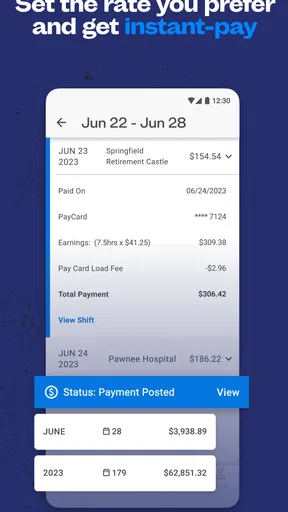
Payment details can depend on the facility, the shift arrangement, your location, and the current terms displayed in the app. Before accepting work, carefully review the listed rate, payment conditions, and any applicable policies. You should also confirm how completed shifts are verified and when funds become available. The app may provide payment tracking, but processing times can vary.
Is ShiftKey available everywhere, and what should I know before accepting a shift?
ShiftKey does not necessarily offer the same coverage, professions, facilities, or number of shifts in every city or state. Before accepting an assignment, check the exact location, start and end times, required credentials, cancellation rules, facility instructions, and compensation information. Remember that booking a shift creates a professional commitment, so make sure you can arrive on time and meet all stated requirements.
